Store, find and share construction photos by project
Organise construction site photos by project, room and stage: capture EPB/PEB pre-closure proof, delivery damage and handover evidence on mobile.
Six months after handover, a homeowner emails a photo of a damp patch near the hallway skirting board and claims the heating pipe was poorly insulated. You remember your crew laying 10 cm PUR boards and insulating every collector line, and someone definitely took photos on their phone. The problem: that technician left the company in April, or the picture sits buried among 4,000 personal photos with no project tag and no date stamp.
Structured construction photo documentation turns everyday phone snapshots into reliable project evidence. When every photo is filed directly under the right project, zone, and build stage, you settle disputes in two minutes, back up EPB/PEB compliance, and get final invoices paid faster.
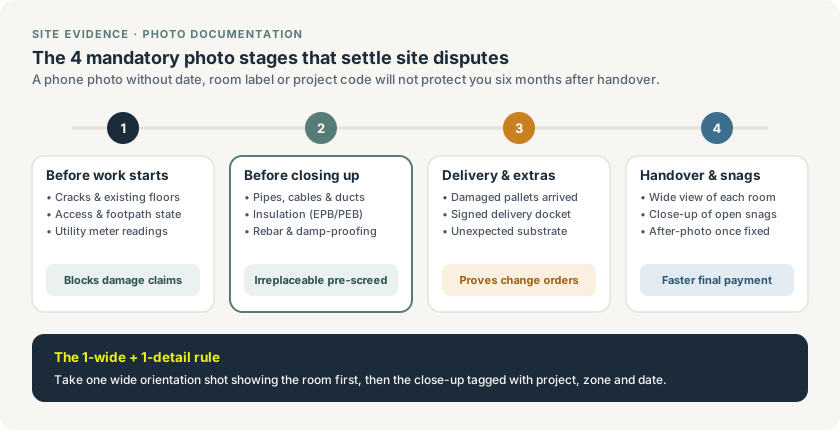
Four mandatory photo stages per project, anchored by the 1-wide + 1-detail rule so every image stays identifiable months later.
The 4 mandatory photo stages on every Belgian site
Asking crews to "take more photos" just fills storage with blurry, unusable close-ups. Instead, make four specific capture moments routine across every job:
- Before work starts (existing condition): Photograph existing cracks, neighbouring facades, driveways, parquet floors, footpaths, and utility meter readings before unloading a single tool. On tight Belgian townhouse renovations, pre-start photos stop unjustified damage claims on day one.
- Before closing up (concealed works & EPB/PEB): Capture pipes, electrical conduits, ventilation ducts, rebar, damp-proof membranes, and insulation thickness with a tape measure or product label visible before screed, plaster, or drywall closes the cavity. In Flanders (EPB) and Brussels/Wallonia (PEB), visual proof of insulation type and thickness is often needed by the energy reporter to avoid conservative penalty values.
- Deliveries and unexpected site conditions: Snap damaged pallets on the lorry tail-lift together with the signed delivery note, and photograph rotted joists, asbestos suspects, or unstable substrates the moment they appear. Those timestamped images substantiate both supplier credit notes and client change order tickets.
- Handover and snagging resolution: Take a clean wide shot of every completed room, photograph each snag item noted during inspection, and pair it with an after-photo once resolved to close the digital handover cleanly.
Follow the 1-wide + 1-detail rule
A macro photo of a pipe joint or a hairline crack proves almost nothing if nobody can tell which room or floor it belongs to. Train every foreman and technician to follow one simple habit:
- Shot 1 (Wide orientation): Step back so a doorway, window, or room corner frames the area.
- Shot 2 (Close-up detail): Move in on the measurement, insulation label, serial number, or defect.
Adding a three-word caption ("1F bathroom manifold") and linking both shots to the project takes under fifteen seconds and makes the photo usable in an insurance claim, EPB/PEB dossier, or Post-Intervention File (PID / DIU).
WhatsApp photo dumps vs project-linked photo documentation
Many Belgian crews still drop site photos into a WhatsApp chat. It feels quick on site, then creates hours of sorting work in the office:
| Criteria | WhatsApp group chat | Dedicated project photo log |
|---|---|---|
| Finding a photo 6 months later | Scroll through hundreds of messages and compressed images | Filter by project, room, stage, or date in seconds |
| Image quality & metadata | Compressed; EXIF data stripped on send | Original resolution with timestamp and uploader preserved |
| Staff turnover | Photos disappear if a worker leaves or wipes their phone | Stored centrally in the company's project record |
| Sharing with client or architect | Manual download, rename and email attachment | Select relevant photos straight into a site report or handover PDF |
| Separation from private life | Mixed with personal camera roll and evening notifications | Strictly scoped to active company projects |
Make photo capture effortless for site teams
Photo discipline fails when an app asks for six mandatory dropdowns before opening the camera. Keep the field workflow fast:
- Two taps to capture: Open the assigned project, pick one of four simple tags (
Pre-start,Pre-closure,Delivery/Extra,Handover), and shoot. - Offline queue: Basements and concrete shells in Belgium often drop mobile signal. Photos must save locally and sync automatically once 4G or Wi-Fi returns.
- Direct link to documents: Attach delivery damage photos straight to the purchase order, execution photos to the work order, and as-built conduit photos to the version-controlled site plan.
Ready to replace scattered phone galleries with searchable project dossiers? See how Enfin construction software connects photos, site reports, work orders and invoicing, compare options in our guide to Belgian construction software, or view pricing.