Construction time tracking: from smartphone to job costing
Daily 30-second mobile time tracking for Belgian contractors: feed live job costing, T&M invoicing and PC 124 payroll exports from one entry.
Every Friday at 16:30, the same scene plays out across Belgian construction companies: crews sit in the yard trying to remember which site they visited on Tuesday morning, how long they spent waiting on a concrete delivery, and how many hours belonged to the extra bathroom wall. By month-end, the office spends an entire evening reconciling messy WhatsApp messages and paper timesheets before the social secretariat deadline.
Reconstructed hours hurt twice. Your job costing stops reflecting reality, and billable extra-work hours vanish before they ever reach an invoice. Moving to a daily 30-second mobile entry solves all three bottlenecks at once: live job costing, time-and-materials billing, and Belgian PC 124 payroll preparation.
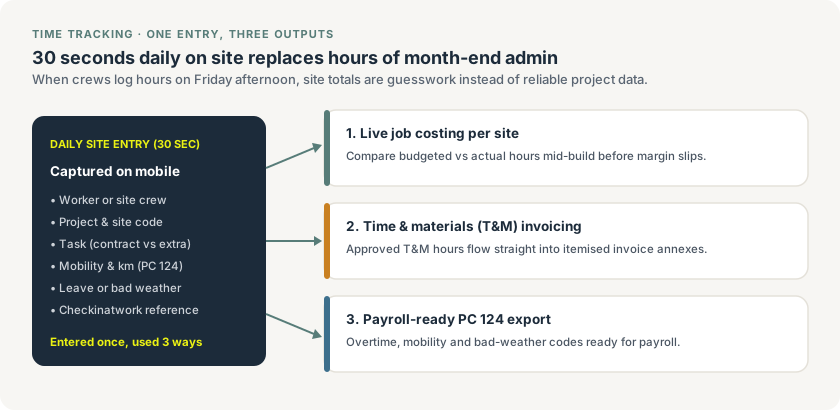
One daily 30-second site entry feeds live job costing, verifiable T&M billing and PC 124 payroll exports without duplicate admin.
Why daily entry beats Friday timesheets
Memory fades fast when a crew rotates across two or three sites in a single week. Capturing hours at the end of each workday — either individually per worker or by the foreman for the whole crew — takes half a minute and keeps three critical distinctions intact:
- Contract hours vs extra work: Tagging hours against the base project or an approved extra-work item prevents T&M work from getting buried inside a fixed-price budget.
- Site code and task phase: Knowing whether labour went into demolition, rough-in, or finishing tells you where your estimate missed, not just that the whole job went over budget.
- Travel, overtime and absences: Recording mobility distance, bad-weather stops, and leave on the day they happen prevents month-end disputes with both employees and your payroll provider.
Belgian construction specifics: PC 124 and Checkinatwork
Generic time-tracking apps built for software agencies break down quickly in Belgian construction because they ignore Joint Committee 124 (Paritair Comité 124 / Commission Paritaire 124) rules and RSZ/ONSS site obligations:
| Belgian requirement | What needs to be tracked | Why it matters for contractors |
|---|---|---|
| PC 124 mobility allowance (mobiliteitsvergoeding) | Daily travel distance / driver vs passenger status | Mandatory tax-advantaged travel compensation for construction workers travelling to sites |
| Bad weather (weerverlet / chômage intempéries) | Exact half-days or full days stopped by rain or frost | Must match your monthly social secretariat codes and RSZ declarations |
| Overtime & KB 213 / relance hours | Standard hours vs eligible construction overtime | Wrong coding costs money in payroll corrections or lost fiscal advantages |
| Checkinatwork (aanwezigheidsregistratie) | Daily presence registration on qualifying sites (≥ €500,000 excl. VAT) | Mandatory RSZ attendance check for employees and subcontractors before starting work |
Keeping your operational time tracking aligned with Checkinatwork and PC 124 codes means your administrator exports one clean monthly summary to your social secretariat instead of re-entering every worker's calendar line by line.
Turning logged hours into live margin control
Labour is usually the biggest swing factor on a Belgian renovation or installation project. If you quote 160 hours at an effective contractor hourly rate and your crew has already burned 115 hours at 50% physical completion, waiting until the final invoice to notice is far too late.
When daily mobile hours flow directly into your project margin dashboard, you catch overruns mid-build. That gives you time to adjust crew allocation, address site bottlenecks with the architect, or raise a documented change order ticket if delays came from client changes or unreadiness of prior trades.
Clean T&M invoicing without client pushback
When clients receive a time-and-materials invoice that simply reads "42 hours labour — €2,730", many stall payment and ask for a breakdown. When time tracking is tied directly to projects and digital work orders, every billable hour carries a date, worker or crew label, and short task note. You can attach the itemised hour log directly to your UBL invoice sent via Peppol, removing the easiest excuse for late payment.
How to roll out mobile time tracking without crew resistance
Field teams resist time tracking only when it feels like surveillance or slows them down after a ten-hour day. Four habits make adoption stick within two weeks:
- Allow foreman crew entry: On larger sites, let the site lead log hours for a three-person crew in one screen rather than forcing every labourer to manage separate logins.
- Pre-fill active sites from the site schedule: Workers should tap today's assigned site from a two-item list, never scroll through 150 closed projects.
- Set a 17:00 daily reminder: A light nudge before crews leave the yard prevents Friday reconstruction.
- Close the weekly loop in the office: Approve submitted hours every Monday morning in ten minutes so errors are fixed while the week is still fresh.
Want to connect time tracking directly with quoting, job costing and invoicing? Explore Enfin construction software, read our guide to Belgian construction software, or view pricing.
Digital delivery notes: a simple smartphone workflow for construction sites
Learn how to replace paper delivery notes with a quick mobile process, link them to projects and keep documentation searchable and auditable.
How much crew time can you book when only two rooms are ready?
Confirm crew time for partially released rooms by reconciling labour-hours, access times, waiting and the actual visit schedule.
Construction retention tracking in Belgium: keep invoices and guarantees distinct
A practical project-control workflow for Belgian contractors tracking retained amounts, invoice balances, acceptance stages and release evidence.